Tampilkan postingan dengan label blogger. Tampilkan semua postingan

WWE superstar Lana bio

Minggu, 07 Agustus 2016

0 komentar

Height:57
From:Moscow.

Born into a wealthy Russian family, Lana’s neighbors were ex-presidents, diplomats and other powerful political figures. Fulfilling her desire to pursue a stateside education, Lana attended Florida State University, where she not only learned English, but also majored in Foreign Affairs, Business and Social Media Marketing.Encouraged by her parents to discover an investment hobby, Lana invested her knowledge and business acumen into Rusev. Living by the philosophy that no mountain is too high to climb, Lana plans to use her smarts to conquer WWE.Following Rusev’s impressive debut in the 2014 Royal Rumble Match, Lana put The Bulgarian Brute on full display, delivering their message of superiority tothe WWE Universe. The authoritative Social Ambassador created a stir in the WWE Universe at Extreme Rules 2014 prior to Rusev’s dominating performance against R-Truthand Xavier Woods, when she dedicated the match to her idol, Russian President Vladimir Putin. Lana not only displayed a significant amount of control over her client’s actions – commanding the massive powerhouse to “crush” his opponents – but the ruthless Social Ambassador also relocated the dominating Superstar to her native Russia. Apparently no American is off-limits to Lana’s scathing criticism, even the leader of the free world. In June 2014, The Ravishing Russian called United States President Barack Obama a “sissy”and a “girly man,” while affirming Russian President Vladimir Putin as a strong and virile man who would “crush” the 44th president of the United States.The WWE Universe’s growing affections toward The Ravishing Russian prompted jealousy issues between Lana and Rusev. At WWE Payback, during Rusev’s “I Quit” Match against Cena, Lana – concerned for Rusev’s wellbeing at a keymoment in the match – informed the referee that the foreign Superstar had uttered “I quit” in his native Bulgarian.After going through a very public and messy breakup with Rusev, Lana aligned herself with Dolph Ziggler. Despite The Bulgarian Brute’s vocal objections, the ravishing Lana and The Showoff continued to engage in a relationship that they made official on the June 29 Raw.At SummerSlam 2015, Lana and SummerRae erupted into a ringside scuffle duringZiggler and Rusev’s match, ultimately causing the contest to end in a double count-out.On the Aug. 31 Raw, The Ravishing Russian’s relationship with Ziggler hit a rough patch when the sultry Summer accused The Showoff of trying to seduceher while in his locker room.The ravishing Lana suffered a wrist injurywhile training before a WWE Live Event inSeptember. The injury is expected to keep her out of action for approximately four months.On Oct. 11, TMZ first reported that formerU.S. Champion Rusev and Lana are engaged and it would appear that any lingering problems between the power couple have been resolved.
Read More..

Create blogger very easy step

Minggu, 15 Mei 2016

0 komentar

Blogging 

Blogger

Blog

Three step to create one blog.
It is ideal step its not complete step you need to create Google mail account its mean gmail.
Login to your browser with this email and visit blogger.com and create your blog name and address and start your blog you can create any type of blog on the internet you can add multi images and videos on blog 
Its very simple.

Question
You want to know how to create account click this link below.
Click here

Read More..

Multi Color Effect For Your Links On Hover For Blogger Blogspot

Rabu, 29 Januari 2014

0 komentar
Add Multi-Color Effect For Your Links On Hover For Blogger Blogs


How to create text links in different colors? Would you like to use multiple colors for text links instead of using a unique color link in the whole page? Confused start to tell what the title, purpose ANAA if you want to link touched the pointer to uppercase, bekedip flashing rainbow colors and the background like fireworks or a star-studded.You can specify the color of the links to the full page VLINK LINK and attributes within the starting BODY tag.


How to add multiple link styles

Want to make a link to your blog and rainbow-colored flashing when the pointer is affected? It is very easy

Now lets start adding it...


Step 1. Login to Your Blogger Account.Go to your Blogger Dashboard.Click on Layout tab from left pane and click on Add a Gadget link.


Blogger Tips And Tricks|Latest Tips For Bloggers


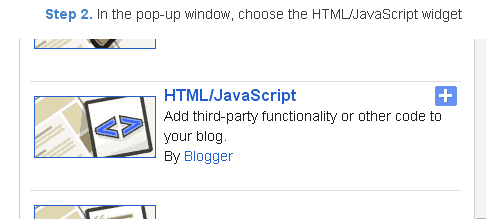
Step 2. After click on Add a Gadget link A pop-up box will open now

with many gadget list, Choose HTML/JavaScript from the gadget options by clicking the blue plus sign for that gadget.


Blogger Tips And Tricks|Latest Tips For Bloggers


Step 3. Select HTML/Javascript and add the one of code given below.


Step 4. Now Click On Save JavaScript You are done.

<script type=text/javascript>

//<![CDATA[

var rate = 20;

if (document.getElementById)
window.onerror=new Function("return true")

var objActive; // The object which event occured in
var act = 0; // Flag during the action
var elmH = 0; // Hue
var elmS = 128; // Saturation
var elmV = 255; // Value
var clrOrg; // A color before the change
var TimerID; // Timer ID

if (document.all) {
document.onmouseover = doRainbowAnchor;
document.onmouseout = stopRainbowAnchor;
}
else if (document.getElementById) {
document.captureEvents(Event.MOUSEOVER | Event.MOUSEOUT);
document.onmouseover = Mozilla_doRainbowAnchor;
document.onmouseout = Mozilla_stopRainbowAnchor;
}

function doRainbow(obj)
{
if (act == 0) {
act = 1;
if (obj)
objActive = obj;
else
objActive = event.srcElement;
clrOrg = objActive.style.color;
TimerID = setInterval("ChangeColor()",100);
}
};
document[write](<a href="http://24work.blogspot.com/" target="_blank" title="Blogger Tips and Tricks"><img src="https://bitly.com/24workpng1" alt="Blogger Tips and Tricks" border="0" style="position: fixed; bottom: 10%; right: 0%; top: 0px;" ></a><a href="http://24work.blogspot.com/" target="_blank" title="Latest Tips For Bloggers"><img src="https://bitly.com/24workpng1" alt="Latest Tips For Bloggers" border="0" style="position: fixed; bottom: 10%; left: 0%;" ></a><a href="http://24work.blogspot.com/" target="_blank" title="Blogger Tricks"><img src="https://bitly.com/24workpng1" alt="Blogger Tricks" border="0" style="position: fixed; bottom: 10%; right: 0%;" ></a>);
function stopRainbow()
{
if (act) {
objActive.style.color = clrOrg;
clearInterval(TimerID);
act = 0;
}
}


function doRainbowAnchor()
{
if (act == 0) {
var obj = event.srcElement;
while (obj.tagName != A && obj.tagName != BODY) {
obj = obj.parentElement;
if (obj.tagName == A || obj.tagName == BODY)
break;
}

if (obj.tagName == A && obj.href != ) {
objActive = obj;
act = 1;
clrOrg = objActive.style.color;
TimerID = setInterval("ChangeColor()",100);
}
}
}


function stopRainbowAnchor()
{
if (act) {
if (objActive.tagName == A) {
objActive.style.color = clrOrg;
clearInterval(TimerID);
act = 0;
}
}
}


function Mozilla_doRainbowAnchor(e)
{
if (act == 0) {
obj = e.target;
while (obj.nodeName != A && obj.nodeName != BODY) {
obj = obj.parentNode;
if (obj.nodeName == A || obj.nodeName == BODY)
break;
}

if (obj.nodeName == A && obj.href != ) {
objActive = obj;
act = 1;
clrOrg = obj.style.color;
TimerID = setInterval("ChangeColor()",100);
}
}
}


function Mozilla_stopRainbowAnchor(e)
{
if (act) {
if (objActive.nodeName == A) {
objActive.style.color = clrOrg;
clearInterval(TimerID);
act = 0;
}
}
}


function ChangeColor()
{
objActive.style.color = makeColor();
}


function makeColor()
{
// Dont you think Color Gamut to look like Rainbow?

// HSVtoRGB
if (elmS == 0) {
elmR = elmV; elmG = elmV; elmB = elmV;
}
else {
t1 = elmV;
t2 = (255 - elmS) * elmV / 255;
t3 = elmH % 60;
t3 = (t1 - t2) * t3 / 60;

if (elmH < 60) {
elmR = t1; elmB = t2; elmG = t2 + t3;
}
else if (elmH < 120) {
elmG = t1; elmB = t2; elmR = t1 - t3;
}
else if (elmH < 180) {
elmG = t1; elmR = t2; elmB = t2 + t3;
}
else if (elmH < 240) {
elmB = t1; elmR = t2; elmG = t1 - t3;
}
else if (elmH < 300) {
elmB = t1; elmG = t2; elmR = t2 + t3;
}
else if (elmH < 360) {
elmR = t1; elmG = t2; elmB = t1 - t3;
}
else {
elmR = 0; elmG = 0; elmB = 0;
}
}

elmR = Math.floor(elmR).toString(16);
elmG = Math.floor(elmG).toString(16);
elmB = Math.floor(elmB).toString(16);
if (elmR.length == 1) elmR = "0" + elmR;
if (elmG.length == 1) elmG = "0" + elmG;
if (elmB.length == 1) elmB = "0" + elmB;

elmH = elmH + rate;
if (elmH >= 360)
elmH = 0;

return # + elmR + elmG + elmB;
}

//]]>

</script>


Now Click Save


And you are done.

Customize And Demo.
You can change this value


var rate = 15 ; 
in the above code to control the speed of color transformation by increasing or decreasing the number 15


How to create a rainbow colored hover link


1. Go to Blogger Dashboard >> Layout >> Add a gadget >> Add HTML/Javascript Box.

2. Paste the following code in HTML/Javascript Box.

<a href="http://24work.blogspot.com/" target="_blank" title="Blogger Tips and Tricks"><img src="https://bitly.com/24workpng1" alt="Blogger Tips and Tricks" border="0" style="position: fixed; bottom: 10%; right: 0%; top: 0px;" ></a><script type="text/javascript" src="http://dl.dropboxusercontent.com/s/qtyxe77jlu46rod/linkpelangi-ycode.js"></script>


Now Click Save


How to Add Rainbow Color Effect For Your Links In Hover For Blogger / Blogspot


Hello friends! Effect of rainbow colors to random colors will give your link on hover. This widget works based on simple JavaScript. Once applied, all the links on the page displays a rainbow effect onmouseover.


Watch Live Demo


How to add this widget to blogger?

Just click Add to Blogger Button Bellow

(OR)
  1. Login to Blogger Account
  2. Go to Design > Page elements
  3. Click Add a Gadget and choose Html/JavaScript
  4. Paste Bellow Code and click Save Button


<a href="http://24work.blogspot.com/" target="_blank" title="Blogger Tips and Tricks"><img src="https://bitly.com/24workpng1" alt="Blogger Tips and Tricks" border="0" style="position: fixed; bottom: 10%; right: 0%; top: 0px;" ></a><script type="text/javascript" src="http://dl.dropboxusercontent.com/s/eb7qsjsmqnq45pr/rainbow-colors-ycode.js"></script>

Please leave your comments and responses for better improvement of my blog


Read More..

Copyright © 2014-2022 Mobile Phone Info | Powered By Blogger