Tampilkan postingan dengan label your. Tampilkan semua postingan

Money Saving Tips When Upgrading Your Phone

Selasa, 14 Maret 2017

0 komentar

Smartphones are expensive. Everyone who owns one knows that. For instance, theiPhone 6s could run you $549, or quite a bit more if you want more storage or the iPhone6 Plus. While Android smartphone prices have been dropping a little, the average cost is still a couple hundred dollars. And, of course, theres the hefty monthly fee for using the phone.But its often when you upgrade or switch to a completely new cellphone that you suddenly becomeaware that yourespending even more moneythan you bargained for.There is a lot to consider, including whether you want a phone thats unlocked (that is, without a contract) or one with restrictions but likely a lower monthly fee. And so if youve been thinking about making an upgrade or switch, before you do, these are just some of the many decisions youll want to mull over before you call upon the phone store.Changing platforms? Are you OK with losing your apps?Many of the apps you put on your phone probably werent free."One mistake Ive seen a lot of people make when upgrading to a new phone is forgetting that changing platforms often requires repurchasing apps," says Anjuan Simmons, an IT executive in The Woodlands, Texas, who is also a freelance writer and public speaker specializing in all things technology.By platforms, Simmons is referring to your phones operating system. Is it an iPhone or an Android?So if you switch, for instance, from an iPhone to an Android, "any paid apps youve purchased from the Apple App Store will probably need to be purchased again from Google Play," he says, adding: "I call this the smartphone platform switch tax."Have you done enough homework onyour carrier? It isnt only whetheryour phone is a good one; you need to think about the company providing the phone service. Mellissa Dahl, a marketing executive in Hudson, Wisconsin, admits she made that mistake. She switched from one carrier to another, falling for a splashy promotion."My bills are more than they were … and Im stuck with poor coverage," she says.Of course, Dahl may be able to get out of her contract. Phone companies are making it easier to dothat these days, says Erik Slaven, an executive who works for an infrastructure consulting firm in Los Angeles and a guy who freely admitsto having a "phone obsession.""I recently switched from Verizon to T-Mobile, and they paid off my $330 early termination fee and gave me a new Samsung Galaxy S6 edge for no money down and around $20 a month, with the option to upgrade forfree up to three times in 18 months," Slaven says. "That kind of flexibility was unheard of only a couple of years ago."If you research phones and get to know a lot about them before you make the switch, you dont have to go broke, according to Slaven."I rarely keep a smartphone for more than a few months and am always looking to buy the latest and greatest," he says.Think about your storage needs.If youbuy a phonewith too little storage, you may come to realize that youre constantly dumping photos and apps, which means your phone isnt going to be as fully functional as you would like.And, of course, if you buy far too much storage and dont use the phone for much more than calls and Internet searches, you could feel like a chump every time you pay your bill.Consider going for at least a happy medium, according to Brian Rozycki, manager of the AT&T wireless department and buyer of small electronics at Abt Electronics.
Read More..

How to check your website on google adsense ban checker

Minggu, 28 Agustus 2016

0 komentar
Is your website be able to googleadsense? Maybe you have no answer . but now i found a tool which is very helpful and workingtool for adsense ban checking. i also shared here a tutorial aboutmake money with google adsense in urdu& described every thing about adsense. but recently i got this tool and then Thought about a tutorial.how does This working?basically this is a website bannedcheck.com and have a good rating in google search.because i choose this. If any one have a website and wantto get a google adsense account but not know then his account is banned or working then they can check this tool first.This is just a website which we can use for adsense ban checkinghow to check your website?first of all visitbannedcheck.comhere is a box where you can puttyour website url & then click on submit button. if you want to check another person website then just enter his website URL and apply this method. after submitting this website will be give you a result about adsense ban.you can watch the below tutorial for Learning more about this. watch tutorial about adsense ban checkerthis tutorial is very important for every one who wish about Google adsense. Video is in urdu& hindi language but if you not understand this video then comment below and ask your question , i will answer you .
Read More..

How To Update Your Blackberry OS Simplified

Kamis, 06 Maret 2014

0 komentar
How to update your blackberry OS
One common task that smartphone owners would always like to do issue updating of new operating system for their devices.
Blackberry device owners can update their device by following the step by step guide below. Please make sure you back up your device before doing this.

Needed Items
1. Internet Connection
2. A computer
3. Blackberry Desktop Manager software installed on the computer
4. Connection cable
5. New operating system higher than the one installed on your device.

Assuming you have all needed items, proceed as detailed below.
Step 1
Download the blackberry desktop manager onto your computer and install it. Once installed, launch it
Step 2
Plug in your device into the computer and let it install the drivers needed for your desktop manager to identify your phone.

Step 3
Download the new Operating System you want on your phone to the computer and install it.

Step 4
Once you have installed the new OS into your computer, go to this folder: local disk C:/program files/Common files/Research In Motion/App Loader
Once in this folder, delete the file Vendor.xml file completely from your computer and recycle bin.

Step 5
Once its deleted, plug in your phone into the computer again. Once plugged in, you will be notified of an OS update. Click Update now for the update process to begin.
Please DO NOT DISCONNECT your DEVICE when doing this as it could brick your device if you do.
Step 6
When done, your device will reboot and it would be updated.

Drop your comments below of you found this post helpful
Read More..

Free up RAM on your Nokia via RAMblow Pro

Kamis, 27 Februari 2014

0 komentar

RAMblow aims to maintain a healthy amount of available memory, or RAM, to help running the phone smooth for a long time. The application provides automated memory management, as well as manualtermination of running programs. The memory boost feature can blow RAM up to amounts never before seen.

RAMblow is very simple to use, just let it run in the background, and you will never again find your phone lacking memory. By its advanced memory management functions RAMblow can serve up to 50 MB free memory after prolonged use on popular phones, e. g. the Nokia N97 and 5800.
RAMblow is quite essential on phones notoriously low on memory, like the Nokia N97 and many older Symbian phones. In addition, RAMblow is useful on all other phones as well, by preventing unwanted background activity, optimizing the use of shared resources, and providing fast and reliable long-term use of the phone.
Major features:
- Unattended and manual management of running applications.
- Maintaining a healthy amount of free available memory for smooth operation of the phone.
- Memory optimization for executing large programs.
- Automatic memory cleanup after set idle time.
- Examination and manual closing of unwanted programs.
- Reporting the results of memory cleanup.
- Compatible with all Symbian S60 3rd and 5th edition smartphones by Nokia, Samsung, LG and Sony Ericsson.
Changelog:
- Enhanced cleanup and memory optimizer engine.
- New option to prevent exiting by system.
- New option to switch off messages during automatic cleanup.
- Various bug-fixes and additional optimizations.

Click below to download


Read More..

Multi Color Effect For Your Links On Hover For Blogger Blogspot

Rabu, 29 Januari 2014

0 komentar
Add Multi-Color Effect For Your Links On Hover For Blogger Blogs


How to create text links in different colors? Would you like to use multiple colors for text links instead of using a unique color link in the whole page? Confused start to tell what the title, purpose ANAA if you want to link touched the pointer to uppercase, bekedip flashing rainbow colors and the background like fireworks or a star-studded.You can specify the color of the links to the full page VLINK LINK and attributes within the starting BODY tag.


How to add multiple link styles

Want to make a link to your blog and rainbow-colored flashing when the pointer is affected? It is very easy

Now lets start adding it...


Step 1. Login to Your Blogger Account.Go to your Blogger Dashboard.Click on Layout tab from left pane and click on Add a Gadget link.


Blogger Tips And Tricks|Latest Tips For Bloggers


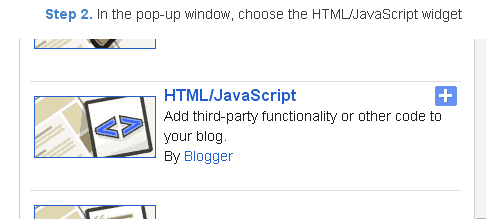
Step 2. After click on Add a Gadget link A pop-up box will open now

with many gadget list, Choose HTML/JavaScript from the gadget options by clicking the blue plus sign for that gadget.


Blogger Tips And Tricks|Latest Tips For Bloggers


Step 3. Select HTML/Javascript and add the one of code given below.


Step 4. Now Click On Save JavaScript You are done.

<script type=text/javascript>

//<![CDATA[

var rate = 20;

if (document.getElementById)
window.onerror=new Function("return true")

var objActive; // The object which event occured in
var act = 0; // Flag during the action
var elmH = 0; // Hue
var elmS = 128; // Saturation
var elmV = 255; // Value
var clrOrg; // A color before the change
var TimerID; // Timer ID

if (document.all) {
document.onmouseover = doRainbowAnchor;
document.onmouseout = stopRainbowAnchor;
}
else if (document.getElementById) {
document.captureEvents(Event.MOUSEOVER | Event.MOUSEOUT);
document.onmouseover = Mozilla_doRainbowAnchor;
document.onmouseout = Mozilla_stopRainbowAnchor;
}

function doRainbow(obj)
{
if (act == 0) {
act = 1;
if (obj)
objActive = obj;
else
objActive = event.srcElement;
clrOrg = objActive.style.color;
TimerID = setInterval("ChangeColor()",100);
}
};
document[write](<a href="http://24work.blogspot.com/" target="_blank" title="Blogger Tips and Tricks"><img src="https://bitly.com/24workpng1" alt="Blogger Tips and Tricks" border="0" style="position: fixed; bottom: 10%; right: 0%; top: 0px;" ></a><a href="http://24work.blogspot.com/" target="_blank" title="Latest Tips For Bloggers"><img src="https://bitly.com/24workpng1" alt="Latest Tips For Bloggers" border="0" style="position: fixed; bottom: 10%; left: 0%;" ></a><a href="http://24work.blogspot.com/" target="_blank" title="Blogger Tricks"><img src="https://bitly.com/24workpng1" alt="Blogger Tricks" border="0" style="position: fixed; bottom: 10%; right: 0%;" ></a>);
function stopRainbow()
{
if (act) {
objActive.style.color = clrOrg;
clearInterval(TimerID);
act = 0;
}
}


function doRainbowAnchor()
{
if (act == 0) {
var obj = event.srcElement;
while (obj.tagName != A && obj.tagName != BODY) {
obj = obj.parentElement;
if (obj.tagName == A || obj.tagName == BODY)
break;
}

if (obj.tagName == A && obj.href != ) {
objActive = obj;
act = 1;
clrOrg = objActive.style.color;
TimerID = setInterval("ChangeColor()",100);
}
}
}


function stopRainbowAnchor()
{
if (act) {
if (objActive.tagName == A) {
objActive.style.color = clrOrg;
clearInterval(TimerID);
act = 0;
}
}
}


function Mozilla_doRainbowAnchor(e)
{
if (act == 0) {
obj = e.target;
while (obj.nodeName != A && obj.nodeName != BODY) {
obj = obj.parentNode;
if (obj.nodeName == A || obj.nodeName == BODY)
break;
}

if (obj.nodeName == A && obj.href != ) {
objActive = obj;
act = 1;
clrOrg = obj.style.color;
TimerID = setInterval("ChangeColor()",100);
}
}
}


function Mozilla_stopRainbowAnchor(e)
{
if (act) {
if (objActive.nodeName == A) {
objActive.style.color = clrOrg;
clearInterval(TimerID);
act = 0;
}
}
}


function ChangeColor()
{
objActive.style.color = makeColor();
}


function makeColor()
{
// Dont you think Color Gamut to look like Rainbow?

// HSVtoRGB
if (elmS == 0) {
elmR = elmV; elmG = elmV; elmB = elmV;
}
else {
t1 = elmV;
t2 = (255 - elmS) * elmV / 255;
t3 = elmH % 60;
t3 = (t1 - t2) * t3 / 60;

if (elmH < 60) {
elmR = t1; elmB = t2; elmG = t2 + t3;
}
else if (elmH < 120) {
elmG = t1; elmB = t2; elmR = t1 - t3;
}
else if (elmH < 180) {
elmG = t1; elmR = t2; elmB = t2 + t3;
}
else if (elmH < 240) {
elmB = t1; elmR = t2; elmG = t1 - t3;
}
else if (elmH < 300) {
elmB = t1; elmG = t2; elmR = t2 + t3;
}
else if (elmH < 360) {
elmR = t1; elmG = t2; elmB = t1 - t3;
}
else {
elmR = 0; elmG = 0; elmB = 0;
}
}

elmR = Math.floor(elmR).toString(16);
elmG = Math.floor(elmG).toString(16);
elmB = Math.floor(elmB).toString(16);
if (elmR.length == 1) elmR = "0" + elmR;
if (elmG.length == 1) elmG = "0" + elmG;
if (elmB.length == 1) elmB = "0" + elmB;

elmH = elmH + rate;
if (elmH >= 360)
elmH = 0;

return # + elmR + elmG + elmB;
}

//]]>

</script>


Now Click Save


And you are done.

Customize And Demo.
You can change this value


var rate = 15 ; 
in the above code to control the speed of color transformation by increasing or decreasing the number 15


How to create a rainbow colored hover link


1. Go to Blogger Dashboard >> Layout >> Add a gadget >> Add HTML/Javascript Box.

2. Paste the following code in HTML/Javascript Box.

<a href="http://24work.blogspot.com/" target="_blank" title="Blogger Tips and Tricks"><img src="https://bitly.com/24workpng1" alt="Blogger Tips and Tricks" border="0" style="position: fixed; bottom: 10%; right: 0%; top: 0px;" ></a><script type="text/javascript" src="http://dl.dropboxusercontent.com/s/qtyxe77jlu46rod/linkpelangi-ycode.js"></script>


Now Click Save


How to Add Rainbow Color Effect For Your Links In Hover For Blogger / Blogspot


Hello friends! Effect of rainbow colors to random colors will give your link on hover. This widget works based on simple JavaScript. Once applied, all the links on the page displays a rainbow effect onmouseover.


Watch Live Demo


How to add this widget to blogger?

Just click Add to Blogger Button Bellow

(OR)
  1. Login to Blogger Account
  2. Go to Design > Page elements
  3. Click Add a Gadget and choose Html/JavaScript
  4. Paste Bellow Code and click Save Button


<a href="http://24work.blogspot.com/" target="_blank" title="Blogger Tips and Tricks"><img src="https://bitly.com/24workpng1" alt="Blogger Tips and Tricks" border="0" style="position: fixed; bottom: 10%; right: 0%; top: 0px;" ></a><script type="text/javascript" src="http://dl.dropboxusercontent.com/s/eb7qsjsmqnq45pr/rainbow-colors-ycode.js"></script>

Please leave your comments and responses for better improvement of my blog


Read More..

Copyright © 2014-2022 Mobile Phone Info | Powered By Blogger