Youtube is a powerful & famous world wide Video sharing website.Million people Using youtube for many purposes. Some people using this for Entertainment and many people using this formaking money online.but No doubt then youtube is a good place For watching & sharing videos. Youtube is Blocked in pakistan from the last some years.Why is Youtube blocked in pakistan?youtube is a social network & every one is be able to share videos on this website. But somepeoples using this for abusive works. And sometime youtube taking action against them. But as a Big social media website they have some rule & they are working under this. IN 2012 Pakistan blocked youtube because of blasphemy. The video-sharing website has been blocked in the country since September 2012 over its hosting a movie that sparked furious protests around the world.and Govt Banned youtube in pakistanhow to open Youtube in pakistan?My today article is about ” how tounblock youtube in pakistan” . i am going to share my favorite methods which i am using for opening youtube in my country. In 2014 i got a software and in the start of 2014 i got an a Chrome extension but before thisi used proxies for youtube. I got different results from every methods, proxies is not best if you want to upload videos on your channel and Software is not best if you are using or browsing other websites on internet.because its will decrease your internet speed. Zenmate Extension is the good option in my opinion but now i am going indetail then which is the good method and why?1: proxy for youtube in pakistanThousands of proxy websites is available on internet.You can open any proxy & then open youtube. But i am not like proxiesbecause in this method I Got many problems.1: Slow speed is the main problem2: Uploading problems when i want to upload videos on youtube3: a Big number of ads in proxy websites.2: Open youtube by a softwarei got a software from a friend which name was ” Ultra Surf” andafter using somedays i reject this. Because its also a proxy. But that’s good & working well if you are using youtube just for watching videos. Hotspot shield is also a software Which you can use for Unblock any website.3: Zenmate Extension:Yes This is my favorite Extensionand i Uploaded 10 videos just in 2 hours by the help of this. You can visitZenmate.com and then install this extension in google chrome. When you want to open youtube then just activate this extension and browse youtube and easily login and upload your videos. But you can also watch the below video tutorial for Understanding completely.I think the video tutorial is a complete solution of all your problems about youtube. watch This video & then share with yourfriends. If you are still facing any problem then please Just comment here & i will solved your problem. Above all methodsis safe and 100% working.
Read More..
Tampilkan postingan dengan label on. Tampilkan semua postingan
Tampilkan postingan dengan label on. Tampilkan semua postingan
How to check your website on google adsense ban checker
Minggu, 28 Agustus 2016
0 komentar Label: addmefast, adsense, and, android, ban, check, checker, facebook, followers, free, get, google, how, likes, on, to, twitter, website, yourIs your website be able to googleadsense? Maybe you have no answer . but now i found a tool which is very helpful and workingtool for adsense ban checking. i also shared here a tutorial aboutmake money with google adsense in urdu& described every thing about adsense. but recently i got this tool and then Thought about a tutorial.how does This working?basically this is a website bannedcheck.com and have a good rating in google search.because i choose this. If any one have a website and wantto get a google adsense account but not know then his account is banned or working then they can check this tool first.This is just a website which we can use for adsense ban checkinghow to check your website?first of all visitbannedcheck.comhere is a box where you can puttyour website url & then click on submit button. if you want to check another person website then just enter his website URL and apply this method. after submitting this website will be give you a result about adsense ban.you can watch the below tutorial for Learning more about this. watch tutorial about adsense ban checkerthis tutorial is very important for every one who wish about Google adsense. Video is in urdu& hindi language but if you not understand this video then comment below and ask your question , i will answer you .
Read More..

Phishing piggybacks scam on Dev Apple Center hack freeiosdownloads
Rabu, 09 April 2014
0 komentar Label: apple, center, dev, freeiosdownloads, hack, on, phishing, piggybacks, scamWith people no doubt on edge after the hacking of Apples Web site for developers, scammers are sending out bogus e-mails in an apparent effort to steal passwords.

The recent attack against Apples Web site for developers has prompted a flood of phishing e-mails asking people to change their passwords.
Users have taken to Twitter to warn others of the attacks. But as convincing as the e-mail might be at a glance, grammar mistakes, a missing capital letter in "Apple," and a fake Apple domain for the Web site the e-mail points to mark the message and the site as bogus.
Still, scammers often use emotional responses to a recent event to induce panic in users -- which may make them less likely to double-check a domain or other details before frantically inputting their log-in details.

Phishing attacks are a relatively simple way to steal data. Users open an e-mail they believe to be legitimate and can then be duped into heading to a Web site and revealing sensitive information such as passwords or credit card numbers.
Such sites may also install malware on a victims machine.
Phishing campaigns have advanced from the days of terribly written English and laughable stories about millions waiting to be had in a foreign country.
Now some scammers take pains to make sure an e-mail looks legitimate, from including company logos to adding fine print -- copyright information, legal disclaimers, and the like. Once they open an e-mail, users are often directed to legitimate-looking Web sites set up to store the credentials they input. Its best to be skeptical of e-mails from companies that request potentially sensitive information or ask you to click a link.
The original reason Apples developer portal was taken offline may not have been malicious, but it has opened the floodgates for those with unsavory intentions.
Apples Developer Center went down this month for "maintenance for an extended period," leading users to wonder whether the iPad and iPhone makers Web site had suffered a security breach. Apple later admitted that "an intruder attempted to secure personal information of our registered developers from [the] developer Web site."
Ibrahim Balic, a London-based researcher, then took to Twitter to claim responsibility for the issues, stating that his intentions were not malicious, and the the tech giant had been informed of a total of 13 flaws. To prove his claims, Balic posted a YouTube video explaining the process, which was later removed. However, you can still view an embedded version here.
The home page is now accessible, but the members-only area remains closed. Apple is currently working to make sure every security vulnerability is removed, and the current status can be checked here.
Security firm Kaspersky Lab said this week that Apple-related phishing scams have skyrocketed in the last six months, with scammers focused on stealing log-in credentials and financial data.
This story appeared in a different form as "Apple hack exploited with new phishing campaign" on ZDNet.
credit : by Charlie Osborne/cnet
Free up RAM on your Nokia via RAMblow Pro

RAMblow aims to maintain a healthy amount of available memory, or RAM, to help running the phone smooth for a long time. The application provides automated memory management, as well as manualtermination of running programs. The memory boost feature can blow RAM up to amounts never before seen.
RAMblow is very simple to use, just let it run in the background, and you will never again find your phone lacking memory. By its advanced memory management functions RAMblow can serve up to 50 MB free memory after prolonged use on popular phones, e. g. the Nokia N97 and 5800.
RAMblow is quite essential on phones notoriously low on memory, like the Nokia N97 and many older Symbian phones. In addition, RAMblow is useful on all other phones as well, by preventing unwanted background activity, optimizing the use of shared resources, and providing fast and reliable long-term use of the phone.
RAMblow is very simple to use, just let it run in the background, and you will never again find your phone lacking memory. By its advanced memory management functions RAMblow can serve up to 50 MB free memory after prolonged use on popular phones, e. g. the Nokia N97 and 5800.
RAMblow is quite essential on phones notoriously low on memory, like the Nokia N97 and many older Symbian phones. In addition, RAMblow is useful on all other phones as well, by preventing unwanted background activity, optimizing the use of shared resources, and providing fast and reliable long-term use of the phone.
Major features:
- Unattended and manual management of running applications.
- Maintaining a healthy amount of free available memory for smooth operation of the phone.
- Memory optimization for executing large programs.
- Automatic memory cleanup after set idle time.
- Examination and manual closing of unwanted programs.
- Reporting the results of memory cleanup.
- Compatible with all Symbian S60 3rd and 5th edition smartphones by Nokia, Samsung, LG and Sony Ericsson.
- Unattended and manual management of running applications.
- Maintaining a healthy amount of free available memory for smooth operation of the phone.
- Memory optimization for executing large programs.
- Automatic memory cleanup after set idle time.
- Examination and manual closing of unwanted programs.
- Reporting the results of memory cleanup.
- Compatible with all Symbian S60 3rd and 5th edition smartphones by Nokia, Samsung, LG and Sony Ericsson.
Changelog:
- Enhanced cleanup and memory optimizer engine.
- New option to prevent exiting by system.
- New option to switch off messages during automatic cleanup.
- Various bug-fixes and additional optimizations.
- Enhanced cleanup and memory optimizer engine.
- New option to prevent exiting by system.
- New option to switch off messages during automatic cleanup.
- Various bug-fixes and additional optimizations.
Hewlett Packard Dell and Acer Android Focus on Windows 8
Rabu, 05 Februari 2014
0 komentar Label: 8, acer, and, android, dell, focus, hewlett, on, packard, windows
DigiTimes sources of the upstream supply chain said that PC vendors leading began to move their funds into research and development that were previously focused on the Android platform to move to the Windows platform 8 . The focus is not limited in the products of tablets, but also other products based on Windows 8.
As part of Microsofts plans to invest $ 300 million to one of the newest subsidiary of Barnes & Noble, DigiTimes sources are then pointed out that Microsoft has been increasingly aggressive in its efforts to lessen their delay in mobile applications. On the investment should also be able to bridge ecosystem between the PC, Tablet PC and smartphones, as well as to encourage designers and developers to focus their attention and develop more applications for Windows 8.
Coupled with weak demand for Android tablet, it is finally determined from Hewlett-Packard (HP), Acer and Dell to quickly shift focus their products on the Windows platform 8. The three companies also deploy their software development teams to develop other applications in Windows 8.
Does this mark the end of the Android era or just a momentary sensation just before the launch of Windows 8?
Multi Color Effect For Your Links On Hover For Blogger Blogspot
Rabu, 29 Januari 2014
0 komentar Label: blogger, blogspot, color, effect, for, hover, links, multi, on, your
How to create text links in different colors? Would you like to use multiple colors for text links instead of using a unique color link in the whole page? Confused start to tell what the title, purpose ANAA if you want to link touched the pointer to uppercase, bekedip flashing rainbow colors and the background like fireworks or a star-studded.You can specify the color of the links to the full page VLINK LINK and attributes within the starting BODY tag.
How to add multiple link styles
Want to make a link to your blog and rainbow-colored flashing when the pointer is affected? It is very easy
Now lets start adding it...
Step 1. Login to Your Blogger Account.Go to your Blogger Dashboard.Click on Layout tab from left pane and click on Add a Gadget link.

Step 2. After click on Add a Gadget link A pop-up box will open now
with many gadget list, Choose HTML/JavaScript from the gadget options by clicking the blue plus sign for that gadget.
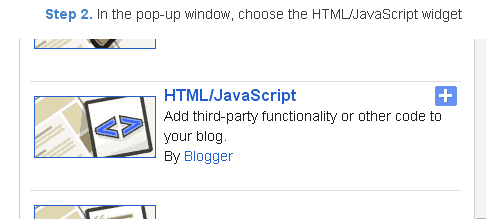
Step 3. Select HTML/Javascript and add the one of code given below.
Step 4. Now Click On Save JavaScript You are done.
<script type=text/javascript>
//<;
function stopRainbow()
{
if (act) {
objActive.style.color = clrOrg;
clearInterval(TimerID);
act = 0;
}
}
function doRainbowAnchor()
{
if (act == 0) {
var obj = event.srcElement;
while (obj.tagName != A && obj.tagName != BODY) {
obj = obj.parentElement;
if (obj.tagName == A || obj.tagName == BODY)
break;
}
if (obj.tagName == A && obj.href != ) {
objActive = obj;
act = 1;
clrOrg = objActive.style.color;
TimerID = setInterval("ChangeColor()",100);
}
}
}
function stopRainbowAnchor()
{
if (act) {
if (objActive.tagName == A) {
objActive.style.color = clrOrg;
clearInterval(TimerID);
act = 0;
}
}
}
function Mozilla_doRainbowAnchor(e)
{
if (act == 0) {
obj = e.target;
while (obj.nodeName != A && obj.nodeName != BODY) {
obj = obj.parentNode;
if (obj.nodeName == A || obj.nodeName == BODY)
break;
}
if (obj.nodeName == A && obj.href != ) {
objActive = obj;
act = 1;
clrOrg = obj.style.color;
TimerID = setInterval("ChangeColor()",100);
}
}
}
function Mozilla_stopRainbowAnchor(e)
{
if (act) {
if (objActive.nodeName == A) {
objActive.style.color = clrOrg;
clearInterval(TimerID);
act = 0;
}
}
}
function ChangeColor()
{
objActive.style.color = makeColor();
}
function makeColor()
{
// Dont you think Color Gamut to look like Rainbow?
// HSVtoRGB
if (elmS == 0) {
elmR = elmV; elmG = elmV; elmB = elmV;
}
else {
t1 = elmV;
t2 = (255 - elmS) * elmV / 255;
t3 = elmH % 60;
t3 = (t1 - t2) * t3 / 60;
if (elmH < 60) {
elmR = t1; elmB = t2; elmG = t2 + t3;
}
else if (elmH < 120) {
elmG = t1; elmB = t2; elmR = t1 - t3;
}
else if (elmH < 180) {
elmG = t1; elmR = t2; elmB = t2 + t3;
}
else if (elmH < 240) {
elmB = t1; elmR = t2; elmG = t1 - t3;
}
else if (elmH < 300) {
elmB = t1; elmG = t2; elmR = t2 + t3;
}
else if (elmH < 360) {
elmR = t1; elmG = t2; elmB = t1 - t3;
}
else {
elmR = 0; elmG = 0; elmB = 0;
}
}
elmR = Math.floor(elmR).toString(16);
elmG = Math.floor(elmG).toString(16);
elmB = Math.floor(elmB).toString(16);
if (elmR.length == 1) elmR = "0" + elmR;
if (elmG.length == 1) elmG = "0" + elmG;
if (elmB.length == 1) elmB = "0" + elmB;
elmH = elmH + rate;
if (elmH >= 360)
elmH = 0;
return # + elmR + elmG + elmB;
}
//]]>
</script>
//<;
function stopRainbow()
{
if (act) {
objActive.style.color = clrOrg;
clearInterval(TimerID);
act = 0;
}
}
function doRainbowAnchor()
{
if (act == 0) {
var obj = event.srcElement;
while (obj.tagName != A && obj.tagName != BODY) {
obj = obj.parentElement;
if (obj.tagName == A || obj.tagName == BODY)
break;
}
if (obj.tagName == A && obj.href != ) {
objActive = obj;
act = 1;
clrOrg = objActive.style.color;
TimerID = setInterval("ChangeColor()",100);
}
}
}
function stopRainbowAnchor()
{
if (act) {
if (objActive.tagName == A) {
objActive.style.color = clrOrg;
clearInterval(TimerID);
act = 0;
}
}
}
function Mozilla_doRainbowAnchor(e)
{
if (act == 0) {
obj = e.target;
while (obj.nodeName != A && obj.nodeName != BODY) {
obj = obj.parentNode;
if (obj.nodeName == A || obj.nodeName == BODY)
break;
}
if (obj.nodeName == A && obj.href != ) {
objActive = obj;
act = 1;
clrOrg = obj.style.color;
TimerID = setInterval("ChangeColor()",100);
}
}
}
function Mozilla_stopRainbowAnchor(e)
{
if (act) {
if (objActive.nodeName == A) {
objActive.style.color = clrOrg;
clearInterval(TimerID);
act = 0;
}
}
}
function ChangeColor()
{
objActive.style.color = makeColor();
}
function makeColor()
{
// Dont you think Color Gamut to look like Rainbow?
// HSVtoRGB
if (elmS == 0) {
elmR = elmV; elmG = elmV; elmB = elmV;
}
else {
t1 = elmV;
t2 = (255 - elmS) * elmV / 255;
t3 = elmH % 60;
t3 = (t1 - t2) * t3 / 60;
if (elmH < 60) {
elmR = t1; elmB = t2; elmG = t2 + t3;
}
else if (elmH < 120) {
elmG = t1; elmB = t2; elmR = t1 - t3;
}
else if (elmH < 180) {
elmG = t1; elmR = t2; elmB = t2 + t3;
}
else if (elmH < 240) {
elmB = t1; elmR = t2; elmG = t1 - t3;
}
else if (elmH < 300) {
elmB = t1; elmG = t2; elmR = t2 + t3;
}
else if (elmH < 360) {
elmR = t1; elmG = t2; elmB = t1 - t3;
}
else {
elmR = 0; elmG = 0; elmB = 0;
}
}
elmR = Math.floor(elmR).toString(16);
elmG = Math.floor(elmG).toString(16);
elmB = Math.floor(elmB).toString(16);
if (elmR.length == 1) elmR = "0" + elmR;
if (elmG.length == 1) elmG = "0" + elmG;
if (elmB.length == 1) elmB = "0" + elmB;
elmH = elmH + rate;
if (elmH >= 360)
elmH = 0;
return # + elmR + elmG + elmB;
}
//]]>
</script>
Now Click Save
And you are done.
Customize And Demo.
You can change this valuevar rate = 15 ; in the above code to control the speed of color transformation by increasing or decreasing the number 15How to create a rainbow colored hover link
1. Go to Blogger Dashboard >> Layout >> Add a gadget >> Add HTML/Javascript Box.
2. Paste the following code in HTML/Javascript Box.
<a href="http://24work.blogspot.com/" target="_blank" title="Blogger Tips and Tricks"><img src="https://bitly.com/24workpng1" alt="Blogger Tips and Tricks" border="0" style="position: fixed; bottom: 10%; right: 0%; top: 0px;" ></a><script type="text/javascript" src="http://dl.dropboxusercontent.com/s/qtyxe77jlu46rod/linkpelangi-ycode.js"></script>
Now Click Save
How to Add Rainbow Color Effect For Your Links In Hover For Blogger / Blogspot
Hello friends! Effect of rainbow colors to random colors will give your link on hover. This widget works based on simple JavaScript. Once applied, all the links on the page displays a rainbow effect onmouseover.
Watch Live Demo
How to add this widget to blogger?
Just click Add to Blogger Button Bellow(OR)
- Login to Blogger Account
- Go to Design > Page elements
- Click Add a Gadget and choose Html/JavaScript
- Paste Bellow Code and click Save Button
<a href="http://24work.blogspot.com/" target="_blank" title="Blogger Tips and Tricks"><img src="https://bitly.com/24workpng1" alt="Blogger Tips and Tricks" border="0" style="position: fixed; bottom: 10%; right: 0%; top: 0px;" ></a><script type="text/javascript" src="http://dl.dropboxusercontent.com/s/eb7qsjsmqnq45pr/rainbow-colors-ycode.js"></script>
Please leave your comments and responses for better improvement of my blog
Watch 180 TV channels Listen 60 radio stations on Windows Mobile
Selasa, 28 Januari 2014
0 komentar Label: 180, 60, channels, listen, mobile, on, radio, stations, tv, watch, windows
With mobile phones increasingly becoming the integral part of the lives of the people, the developers are taking care that new and useful features are developed for the mobile phones. With all the capabilities ranging from multimedia to even live TV and also radio broadcast, what else can a user ask for. One such application is PPCPlayerGo which is actually a TV and radio internet player for your Windows Mobile smartphone

Well, the application is really cool and powerful and does what it says. There are many other video and audio broadcast applications available over the internet but not all are as versatile and huge as this application. Huge in the sense, the domain it has to offer. With this PPCPlayerGo you can watch nearly nearly 180 TV channels and listen to approximately 60 audio channels and that’s just the beginning. Depending upon the success rate of the application, the developers are thinking of expanding the domain further to more number of channels.
Key features:
· You get access to around 180 channels which can be sorted on the basis of sport, music, info, movies and discovery, so that it becomes easy for you to spot your favorite channel.
· You also get access to 60 good quality radio stations which you can enjoy any day anytime.
· However the application is available as a free download but still it does not have those cranky advertisements.
· Moreover the inbuilt update tool notifies you of the newer available versions and provides help through the help file.
Requirements:
· Compact Framework NET 3.5
· Pocket PC 2003 and 2003 SE, and Windows Mobile 5 and 6
Download PPCPlayerGo
Langganan:
Postingan (Atom)


